

Property Animation (PropertyAnimation)
The property animation component PropertyAnimation changes the value of an object's properties continuously to change the state of the target, achieving the animation effect. 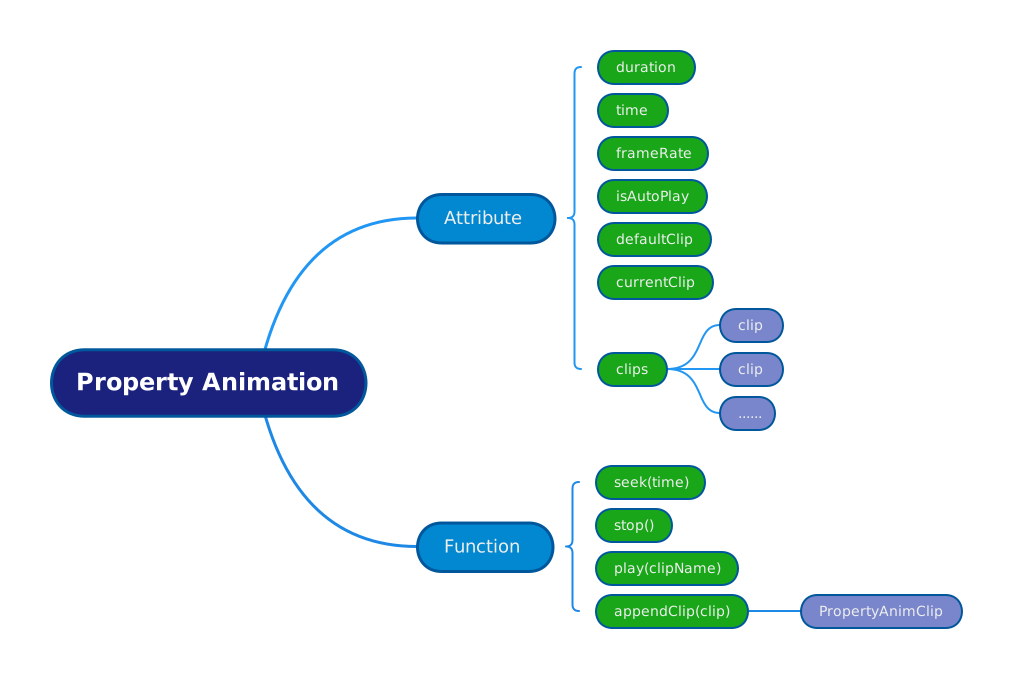
Examples
- Properties of
Object3D:position,scale,rotation - Texture of
Material:uv,offset,tiling Post-processing effectparameters:color,strength
All properties above can be provided as the content that property animation changes.
Basic Usage
Specify a node Object3D in the scene, add the component PropertyAnimation to it; then append a movie clip to the component and you can use it.
TIP
Currently the engine only supports importing Clip assets exported from Unity through Curve curves or Animation data. Custom property animations defined in code are not supported at this time, but this feature will be added in future versions.
// Script for exporting clips in Unity
public class AnimationInfo : InfoBase
{
    [SerializeField] public Animation animation;
    [SerializeField] public List<AnimationClip> clipList;

    public string WriteJson()
    {
        string ret = JsonUtility.ToJson(this);
        return ret;
    }
}// load test model
let node = new Object3D();
scene.addChild(node);
// Add component
let animation = node.addComponent(PropertyAnimation);
// Load clip asset
let res = await fetch('path/to/clip.json')
let json = await res.json()
// Initialize clip
let animClip = new PropertyAnimClip();
// Parse clip
animClip.parse(json);
animClip.wrapMode = WrapMode.Once;
animation.defaultClip = animClip.name;
animation.autoPlay = false;
// Append clip to component
animation.appendClip(animClip);Play Animation
You can use the play method to play the PropertyAnimClip with the corresponding name (name).
animation.play('anim_0', true); // Play from start, true by defaultPause Animation
You can use the stop method to play the specified PropertyAnimClip.
animation.stop();Toggle Animation
You can use the toggle method to play a paused animation, or pause the animation that is playing.
animation.toggle();Specify Animation Time
You can use the seek method to specify the starting time of the animation playback.
animation.seek(1.2);// Specify to 1.2sGet Movie Clip
You can use the getClip method to get the movie clip PropertyAnimClip that has been bound to the component. The parameter is the name of the PropertyAnimClip.
let clip: PropertyAnimClip = animation.getClip('anim_0');Get Current Clip
You can use the currentClip method to get the PropertyAnimClip that is currently playing.
const currentClip = animation.currentClip;Get Animation Time
You can use the time method to get the current time.
const currentClip = animation.time;Example
import { DirectLight, Engine3D, AtmosphericComponent, View3D, HoverCameraController, KelvinUtil, Object3D, Scene3D, CameraUtil, PropertyAnimation, PropertyAnimClip, WrapMode } from '@orillusion/core';
import * as dat from 'dat.gui';

class Sample_PropertyAnim {
    lightObj: Object3D;
    scene: Scene3D;
    engine: Engine3D;
    private animation: PropertyAnimation;

    constructor() {}

    async run() {
        this.engine = await Engine3D.init();

        this.scene = new Scene3D();
        let camera = CameraUtil.createCamera3DObject(this.scene, 'camera');
        camera.perspective(60, this.engine.aspect, 1, 2000.0);
        let ctrl = camera.object3D.addComponent(HoverCameraController);
        ctrl.setCamera(180, -20, 15);

        await this.initScene(this.scene);

        this.scene.addComponent(AtmosphericComponent).sunY = 0.6;

        // create a view with target scene and camera
        let view = new View3D();
        view.scene = this.scene;
        view.camera = camera;
        // start render
        this.engine.startRenderView(view);

        let guiData = {
            click: () => this.animation.play('anim_0', true),
            Seek: 0,
            Speed: 1
        };
        const GUIHelp = new dat.GUI();
        GUIHelp.add(guiData, 'click').name('Restart');
        GUIHelp.add(guiData, 'Seek', 0, 4, 0.01).onChange((v) => {
            this.animation.stop();
            this.animation.seek(v);
        });
        GUIHelp.add(guiData, 'Speed', 0, 1, 0.01).onChange((v) => {
            this.animation.speed = v;
        });
        this.animation.onLateUpdate = () => {
            guiData.Seek = this.animation.time;
            GUIHelp.updateDisplay();
        };
    }

    private async makePropertyAnim(node: Object3D) {
        // add PropertyAnimation
        let animation = node.addComponent(PropertyAnimation);
        // load clip source
        let res = await fetch('https://cdn.orillusion.com/json/anim_0.json');
        let json = await res.json();
        // init clip
        let animClip = new PropertyAnimClip();
        // parse clip
        animClip.parse(json);
        animClip.wrapMode = WrapMode.Loop;
        animation.defaultClip = animClip.name;
        animation.autoPlay = true;
        // add clip to animation
        animation.appendClip(animClip);
        return animation;
    }

    async initScene(scene: Scene3D) {
        /******** light *******/
        {
            this.lightObj = new Object3D();
            this.lightObj.x = 0;
            this.lightObj.y = 30;
            this.lightObj.z = -40;
            this.lightObj.rotationX = 45;
            this.lightObj.rotationY = 0;
            this.lightObj.rotationZ = 45;
            let lc = this.lightObj.addComponent(DirectLight);
            lc.lightColor = KelvinUtil.color_temperature_to_rgb(5355);
            lc.intensity = 2;
            scene.addChild(this.lightObj);
        }

        let duck = await this.engine.res.loadGltf('https://cdn.orillusion.com/PBR/Duck/Duck.gltf');
        this.scene.addChild(duck);
        duck.scaleX = duck.scaleY = duck.scaleZ = 0.02;

        this.animation = await this.makePropertyAnim(duck);
        this.animation.play(this.animation.defaultClip);

        return true;
    }
}

new Sample_PropertyAnim().run();